
Direct thermal or ribbon printing: what is the difference when choosing?
On this page
Printing method affects label and consumables selection. Check what the specific printer supports rather than choosing a roll by dimensions alone.
Direct thermal
Direct thermal printing uses suitable thermal media without a ribbon. When choosing material, consider the label's usage duration and expected exposure conditions.
Thermal transfer with a ribbon
Thermal transfer prints using a ribbon. The printer, label material and ribbon must be matched together; ribbon dimensions, core and winding direction are checked against the printer model.
Selection starts with the item being labelled
Ask what is being marked, on which surface and for how long. Check resistance requirements for friction, moisture or other conditions using approved material and a print sample, rather than assuming one method always fits.
What should I request in the quotation?
Specify the printing method, model and configuration, label dimensions, material and ribbon if required. Ask for consumables to be itemised separately and for a sample to be tested with your equipment and conditions.
For technical details by model: Official manufacturer manual for the TSC TE200 series.
Tailor a business solution
Relevant products in the catalogue - Contact us with a sample, dimensions and model name for a compatibility check.
Guides to continue your selection
To complete details before ordering: Choosing a label printer andLabel roll structure.
The printing method also determines consumables
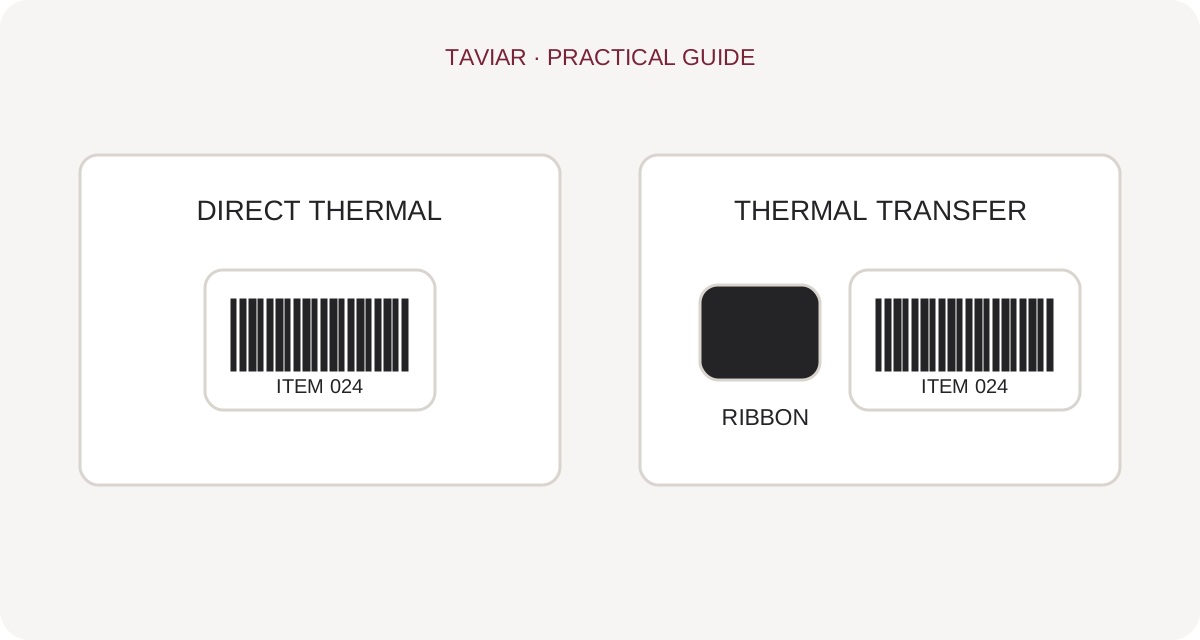
In direct thermal printing, the printhead heats heat-sensitive media. Thermal transfer uses a ribbon to transfer colour onto the label. Do not assume every printer supports both methods: check the model and configuration. Even a roll that physically fits inside the printer must match the printing method.
When choosing printing methods, describe how long the information must last and how the item is handled. Do not change material or ribbon based on price alone. For repeat orders, retain media and ribbon details and check for printer or working-condition changes.
Before switching methods, prepare a test print of your actual content. Check text readability, scanning and software settings retention. A good comparison considers workflow and time spent loading and configuring, not just roll cost.
A short preparation checklist before choosing
- Printer model and configuration
- Existing label and ribbon, if available
- Content sample at actual size
- Usage duration and working environment
How do I check that the solution is suitable?
Prepare a representative work sample. Test it with your equipment and item, record approvals and outstanding questions, and keep the version and specifications for repeat orders. Compare alternatives under the same conditions, not using photographs or prices for different tasks.
More professional information: Manufacturer explanation of thermal printing. Availability and compatibility are checked according to the model and version in use.
Choosing a printing method for the actual workflow
When choosing a label printer, assess the printer, label material and intended use together. Direct thermal printing uses heat-sensitive material without a ribbon. In thermal transfer printing, the ribbon is part of the printing system. Do not assume every printer supports both methods.
Shipping label versus identification that stays on a product
Ask how long information must remain legible, where the product is stored and whether the label faces heat, abrasion or moisture. A shipping label and an inventory identification label may require different choices. Printing method alone is not a durability guarantee.
Compatibility check before changing material
Check supported printing methods and media dimensions in the printer specifications. If a ribbon is required, check its dimensions and label material compatibility too. Run a test print, check clear text and scan the barcode at its intended workstation.
What should I prepare for a compatibility enquiry?
Include the printer model, label dimensions, a photograph of the existing roll and a print sample. Describe whether the use is shipping, pricing, warehousing or product marking. This allows suitability checks without guessing from a general term such as thermal label.
Ribbons, ink films and rolls: which belongs to which printing method?
Different Hebrew spellings of thermal are spelling variations, not two technologies
Searches use different spellings of thermal labels. When ordering, specify the printing method and printer model to avoid confusion. Direct thermal printing uses no ribbon; thermal transfer requires matching ribbon and media. A roll physically fitting inside a printer does not confirm compatibility.
To continue checking, see Printer ribbons.
Ink ribbons are not standard ink cartridges
A barcode printer ribbon is also known as an ink ribbon. Check ribbon dimensions, installation method and the material being printed. Names such as Wax, Wax/Resin and Resin identify ribbon families; do not choose between them solely by price or packaging colour, or promise durability without testing the combination.
To continue checking, see Choosing label material.
What should I do if printing is faint or smudged?
Record label type, ribbon type and print settings. Check that media is installed correctly and the printing method set appropriately according to model instructions. Keep a successful print sample for comparison and contact us with a photograph and exact model, rather than changing several settings together and losing the comparison point.
To continue checking, see Drivers and support links.







